CISS spin filter
A 3D schematic with the model it was made from. Open the model in the editor and make the figure your own in a few minutes.
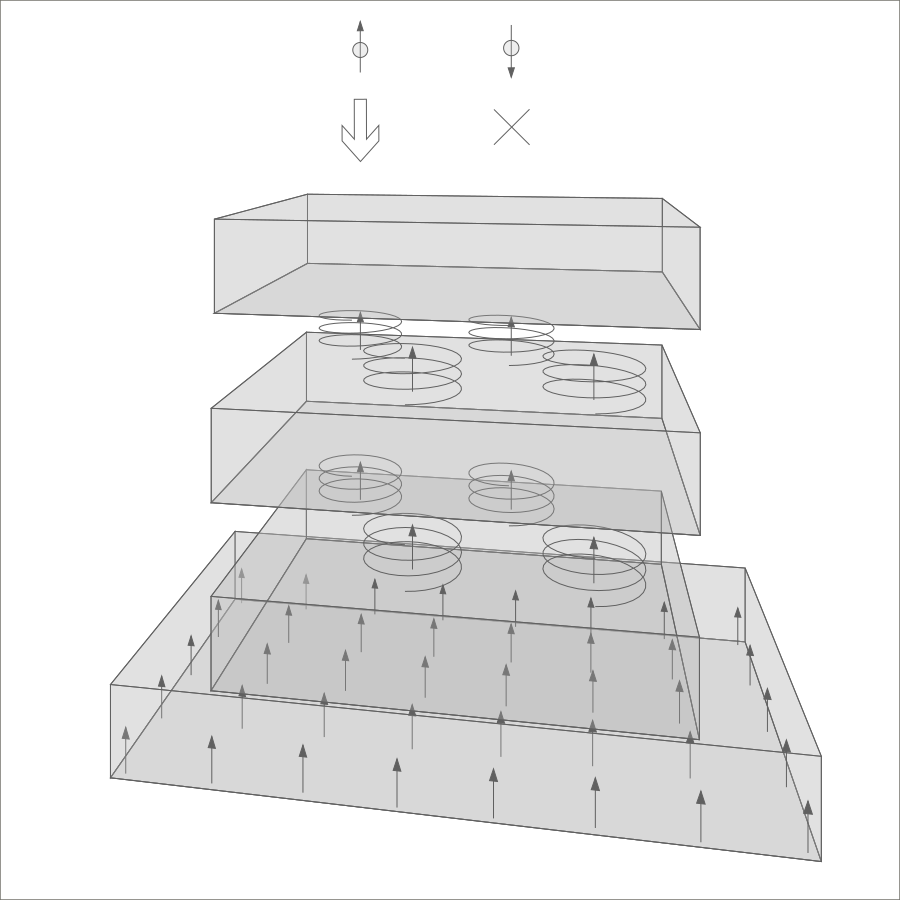
Make this figure yours
- Download the model ciss-filter.xml
- Open the editor in a new tab, no account needed
-
In the editor, choose Import Model and select
ciss-filter.xml.
Things to try
- Turn the camera to see the device from another angle.
- Move the viewpoint to see the device from a different perspective.
- Zoom in or out.
- Check the 'Export mask' box under the 'View' in the menu to make the exported area visible.
- Move the 'Panoramic offset' sliders to fit the projection into the exported area.
- Export the result as a PNG image.
Files
| ciss-filter.xml | The model. Open it in the editor, or read and change it with your own tools. |
| ciss-filter.png | The image above, exported from the editor. |
| ciss-filter.svg | A vector version for Inkscape, Illustrator and other vector editors. Prototype SVG export is planned for the Prototype plan. |
Show the first lines of the model (full file: 495 lines)
<?xml version="1.0"?>
<model>
  <metadata>
    <format id="superlattix" version_major="2" version_minor="1" version_patch="9"/>
    <schema href="https://superlattix.com/schema/v2.1.xsd"/>
    <created at="2026-10-06T18:25:01Z" tool="superlattix-editor" tool_version="0.6.32"/>
  </metadata>
  <element variety="rect" uid="589" specifier="0">
    <pos x="189" y="-0.000061035156" z="489.08032"/>
    <start x="0" y="0" z="1"/>
    <end x="0" y="0" z="0"/>
    <dir x="0" y="1" z="0"/>
    <size l="420.57" w="720" h="0"/>
  </element>
  <element variety="rect" uid="1213" specifier="0">
    <pos x="299.28937" y="100" z="496.70776"/>
    <start x="0" y="0" z="1"/>
    <end x="0" y="0" z="0"/>
    <dir x="0" y="1" z="0"/>
    <size l="405.64636" w="499.013" h="0"/>
  </element>
  <element variety="rect" uid="1551" specifier="0">
    <pos x="300.05206" y="300" z="499.0536"/>
    <start x="0" y="0" z="1"/>
    <end x="0" y="0" z="0"/>
  <!-- … 470 more lines; elements are listed in drawing order -->
View the full file. The format is described in the Superlattix schema.
More schematics to start from
The model files follow the published Superlattix schema. Building something on the format? We would like to hear about it: [email protected].